
Best Equipment for Chatterbate Streaming: Essential Gear Guide
Best Equipment for Chatterbate Streaming: Essential Gear & SetupTable of ContentsChoosing the Right Video Source...
Best Equipment for Chaturbate Streaming: The Complete Gear Guide
💡 Key Takeaways
- The best equipment for Chaturbate streaming starts with three things: a reliable 1080p webcam, an adjustable ring light, and a wired Ethernet connection.
- Lighting and connection stability matter more than camera resolution, fix those first.
- Use a ring light 18 inches or larger with at least 3, 200 lumens and adjustable color temperature (3, 200K, 5, 600K).
- Wired Ethernet is strongly recommended, Wi-Fi often causes drops, buffering, and bitrate instability.
- Viewers tend to tolerate imperfect video more readily than poor audio; a dedicated USB microphone makes a real difference.
- Get the core three right first, 1080p webcam, 18-inch ring light, wired connection, then upgrade from there.
Why Lighting and Stability Matter More Than Camera Resolution
Here's something that often gets overlooked when starting out: a 4K camera pointed into bad lighting is just a more expensive way to look unprofessional. Models who consistently out-earn their peers aren't always running the priciest gear, they figured out early that lighting and connection stability tend to be the real difference-makers.
A top-tier camera broadcasting a dim, shaky stream is still a dim, shaky stream. Viewers don't see the price tag on your webcam. They see the image, and they make a decision within the first few seconds.
HD resolution is often treated as the main goal when it's actually one of the less important variables. A well-lit, stable 720p stream can outperform a dark, jittery 4K feed. Lighting is what fills your frame with usable detail. A wired connection is what keeps that frame reaching the viewer intact.
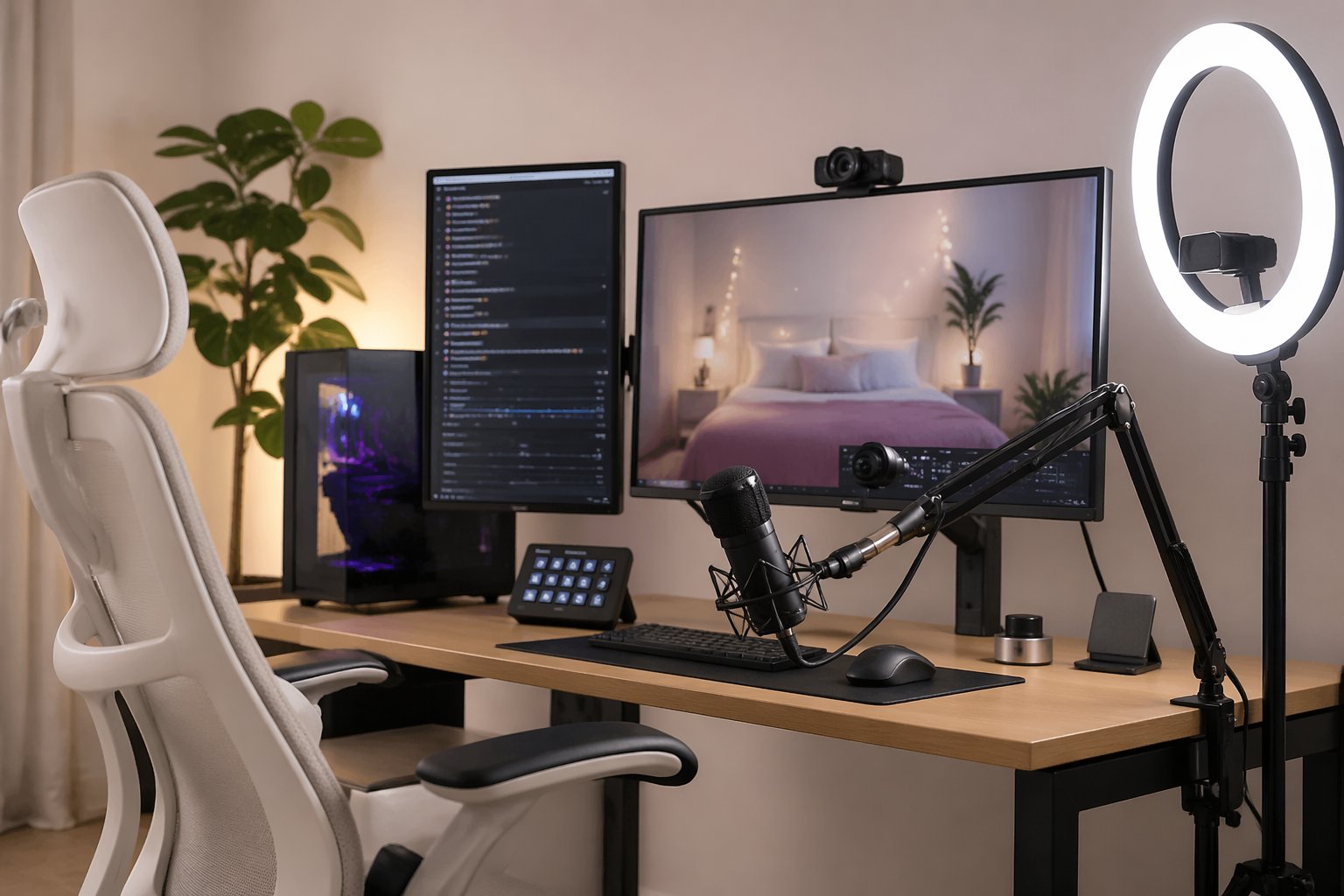
When choosing the best equipment for Chaturbate streaming, three things genuinely move the needle: a reliable 1080p webcam, a ring light with adjustable color temperature, and a wired Ethernet connection. It's worth getting these right before spending money on anything else.
How Stream Quality Affects Viewer Behavior and Tips
On Chaturbate, perceived production quality is one of the signals viewers use when deciding whether to stay. A crisp, well-lit, stable stream tells a viewer, within the first few seconds, that the model is serious and worth their time. It builds credibility before a single word is spoken.
A viewer who clicks into a dark, pixelated, or jittery stream will often leave almost immediately. That drop-off tends to be instinctive. Low production quality creates a trust gap, and most viewers won't stick around to see if things improve.
Poor stream quality doesn't just reduce tips, it can eliminate the opportunity to earn them. Dwell time often drops fastest when lighting is bad, since that's the most immediately visible signal in any thumbnail or live preview.
A well-lit, stable 1080p stream, even on modest hardware, tends to hold viewers longer, bring them back, and turn casual browsers into regulars. If you want to understand how that translates to token rates, see our guide on increasing your token rate per hour.
Webcam Recommendations for Chaturbate Streaming
You don't need a DSLR to stream well on Chaturbate. What you need is consistent 1080p output, reliable autofocus, and decent low-light handling. Here are three options across the main budget tiers, all used regularly by working streamers.
Budget Option: Logitech C920 (~$70, $80)
The Logitech C920 has been a popular entry-level streaming webcam for years, and it still holds up well. It shoots 1080p at 30fps, includes a built-in dual microphone (though a dedicated mic is worth adding, more on that below), and handles moderate lighting reasonably well.
For anyone just starting out, this is a practical first camera. It's widely available, straightforward to set up, and well-regarded for its price range. Check current pricing and availability here.
Mid-Range Option: Logitech C922 Pro (~$100, $120)
The C922 builds on the C920 with 720p/60fps for smoother motion, improved low-light performance, and a slightly wider field of view. If you're streaming regularly and want a step up without moving to a full mirrorless setup, this is a natural next move.
It also supports background removal in OBS and similar software, a useful feature with no extra hardware required. See the C922 Pro here.
Advanced Option: Elgato Facecam (~$150, $200)
The Elgato Facecam is designed specifically for streamers. It delivers true 1080p/60fps with no compression artifacts, uses a Sony sensor that handles variable lighting well, and works with Elgato's Camera Hub software for hands-on control over exposure, white balance, and sharpness.
For Chaturbate models streaming daily or building a high-retention audience, this is a clear step up from the Logitech range. It makes the most sense once your lighting and connection are already sorted. Compare pricing on the Elgato Facecam here.
Lighting Setup: Ring Lights, Placement, and Color Temperature
Lighting is where most new streamers underinvest, and where the visual quality gap shows up most quickly. If you've ever clicked into a stream and immediately felt like something looked "off," bad lighting was likely the reason.
A ring light is the most practical solution for solo streaming. It produces even, flattering illumination with minimal shadow and is easy to position relative to your camera. This is one area where it's worth spending a little more upfront.
Ring Light Specs to Look For
For Chaturbate streaming, aim for a ring light that meets these minimum specs:
- Size: 18 inches or larger. Smaller ring lights (10, 12 inches) often don't produce enough fill light for full-face coverage at a normal streaming distance.
- Brightness: At least 3, 200 lumens, enough to properly expose your face even when competing with ambient room light.
- Color temperature range: 3, 200K, 5, 600K adjustable. Warm tones (3, 200K) suit a softer, lower-light look; cooler daylight tones (5, 500K+) produce a crisper, more polished appearance. Being able to adjust between the two gives you useful flexibility.
- Dimmer control: A stepless dimmer, rather than preset brightness levels, lets you fine-tune exposure more precisely.
Recommended Ring Light: Neewer 18-Inch LED Ring Light (~$80, $110)
The Neewer 18-inch ring light meets all of the specs above at a reasonable price. It comes with a phone and camera mount, a sturdy tripod stand, and a remote for adjusting brightness and color temperature without reaching across your setup.
It's consistently well-reviewed by content creators and streamers for its build quality relative to the price. For most Chaturbate streamers, this is a solid choice, and one you're unlikely to need to replace anytime soon. Find the Neewer 18-inch ring light here.
Placement
Position your ring light directly in front of you at eye level, with your webcam mounted in the center of the ring or directly above it. Keep it two to four feet from your face, close enough for soft, even light without blowing out the exposure.
This setup reduces the two most common unflattering shadow patterns on camera: shadows under your eyes and chin. Try to avoid placing lights behind you or to the side as your primary source, these tend to create silhouettes and uneven skin tone.
Connectivity and Audio: Two Commonly Overlooked Elements
Wired Ethernet vs. Wi-Fi
Wi-Fi is one of the most common causes of stream drops, buffering, and bitrate instability on Chaturbate. Even a strong signal can introduce packet loss and latency variability that a wired connection typically eliminates.
If possible, run an Ethernet cable from your router to your streaming machine. If that's not practical, a powerline Ethernet adapter ($40, $70 for a reliable pair) is the next best option. It's worth sorting your connection before troubleshooting anything else.
For stable 1080p streaming, aim for a consistent upload speed of at least 5 Mbps. Test yours at fast.com or speedtest.net before going live, your actual speed may differ from your plan speed.
Audio: Why It Often Matters More Than Streamers Expect
Viewers will often tolerate slightly soft video before they'll put up with bad audio. Muffled sound, echo, or background noise can drive people away quickly, sometimes faster than visual issues. A webcam's built-in microphone is a starting point, not a real audio solution.
The Blue Snowball iCE (~$50) is a USB condenser microphone that delivers clean vocal capture with minimal room noise pickup. No audio interface needed, it plugs straight into USB and sits neatly on a desk. See the Blue Snowball iCE here.
For streamers ready to spend a little more, the Blue Yeti (~$100, $130) adds gain control, multiple polar patterns, and a built-in headphone monitoring jack so you can hear yourself in real time during streams. Both are widely used and well-reviewed. Compare the Blue Yeti here.
Pair either mic with a simple acoustic panel, or even a heavy curtain behind your streaming position, to cut echo and room reverb. It makes a noticeable difference with no technical complexity involved.
Phrases That Help With Viewer Interaction and Tips
Better equipment gets viewers into the room. The right words tend to keep them there, and move them from watching to tipping. These aren't rigid scripts; they're flexible phrases that some experienced models use to create momentum and help viewers feel involved.
Opening the Stream
A warm, direct opener can set a positive tone and pull viewers in quickly:
- "Hey, welcome in, glad you made it. Let's have some fun tonight."
- "Just getting started. If you're new here, say hi and I'll say hi back."
- "Good to see some familiar names already. Tonight's going to be a good one."
Keep it natural. Viewers tend to respond better to energy that feels genuine rather than rehearsed.
Encouraging Tips Without Being Pushy
Effective tip prompts usually feel like invitations rather than requests. Referencing your tip menu or goals directly can help:
- "My tip menu is pinned, lots of options at every level. Even a small tip goes a long way tonight."
- "We're [X] tokens away from the next goal. Let's get there together."
- "Every tip gets a shoutout, I see you and I appreciate it."
Acknowledging individual tippers by name is one of the more reliable ways to encourage repeat tipping. It costs nothing and takes a couple of seconds.
Keeping Lurkers Engaged
Not every viewer will tip, but engaged lurkers add to your room count, which can attract more viewers. It's worth keeping them warm:
- "Lurkers are welcome too. Just having you here means something."
- "Drop a '1' in the chat if you're enjoying the stream, love knowing you're here."
- "Even if you're just watching, tell me where you're tuning in from."
Closing the Stream
A consistent sign-off can help build the habit of return visits:
- "Thanks everyone, seriously, tonight was great. Follow so you know when I'm back."
- "Same time [day], I'll be back. Don't make me go live to an empty room."
- "You've all been amazing. Tip me on your way out and I'll remember your name next time."
Regulars often return partly because the routine feels familiar. A consistent closing helps reinforce that.
Your Chaturbate Streaming Gear Action Plan
Here's a practical way to move forward based on everything covered above:
- Start with the core three. A 1080p webcam, an 18-inch ring light, and a wired connection form the foundation of any solid Chaturbate setup. If you don't have all three yet, these are your first purchases.
- Test your stream before going live. Use Chaturbate's broadcast test feature or a private stream to check video quality, audio levels, and connection stability before an audience sees it.
- Upgrade incrementally. Once your basics are solid, the Elgato Facecam and a dedicated USB microphone tend to produce the clearest visible and audible improvements beyond the baseline setup.
- Work on your room engagement. Use the phrases above as a starting point and adapt them to your own voice. Pay attention to what resonates with your regular viewers.
- Check your lighting placement regularly. As your setup evolves, your ring light position may need adjustment. A quick check before each session helps keep your visual quality consistent.
- See our full gear guide for specifics. For a complete list of recommended equipment with current pricing and purchase links, visit our complete Chaturbate equipment guide. Every product listed has been selected based on real-world streaming use.
Frequently Asked Questions
What is the core streaming setup often recommended for Chaturbate?
The core setup consists of three things: a reliable 1080p webcam, a ring light with adjustable color temperature and brightness, and a wired Ethernet connection. These three elements tend to have the biggest combined impact on stream quality. It's worth getting them right before spending money on other upgrades.
Why does lighting matter more than camera resolution for Chaturbate streaming?
Lighting is the most immediately visible signal of stream quality. A well-lit 1080p stream typically looks more professional than a poorly lit 4K one. Good lighting helps establish visual credibility within the first few seconds, which is often what determines whether a viewer stays long enough to tip. Poor lighting tends to cause drop-off before the model has said or done anything.
What type of webcam works well for Chaturbate streaming?
A 4K camera isn't necessary. Consistent 1080p output, from a webcam like the Logitech C920, C922 Pro, or Elgato Facecam, is generally more than sufficient. Resolution matters less than lighting quality and connection stability, so those are worth addressing first.
What ring light specs should I look for when setting up for Chaturbate?
Look for an 18-inch or larger ring light with at least 3, 200 lumens, an adjustable color temperature range of 3, 200K, 5, 600K, and a stepless dimmer for precise exposure control. The Neewer 18-inch LED ring light is a well-reviewed option at around $80, $110 that meets all of these requirements.
Why does internet connection type matter for live streaming?
Wi-Fi is a common cause of stream drops, buffering, and unstable bitrate on Chaturbate. Even a strong signal can introduce packet loss and latency variability. A wired Ethernet connection tends to eliminate these issues and is generally worth prioritizing for stable streaming.
Which microphone is a good choice for improving audio on Chaturbate?
The Blue Snowball iCE (~$50) is a practical entry-level upgrade, it plugs directly into USB and produces clean vocal capture. For more control, the Blue Yeti (~$100, $130) adds gain adjustment, multiple polar patterns, and real-time headphone monitoring. Either pairs well with a simple acoustic panel to reduce room echo.
What kinds of phrases can help increase tips during a Chaturbate stream?
Tip prompts tend to work better when they feel like invitations rather than demands. Referencing your tip menu, acknowledging tippers by name, and keeping lurkers engaged with simple chat prompts can all contribute. Openers, goal check-ins, and consistent sign-offs help with viewer retention, which is what ultimately supports token earnings over time.
Related Guides in this Category
All For Models →

Ready to experience live cams?
Watch Live Cams Free